CMZTECH.NET
  • Blog
  • Graphics
  • Virtual Reality
  • 3D Printing
  • Fun Stuff
    • furiosus tangeret solum vitrum >
      • A new friend
      • Chorazin
      • Curious1
      • MRGAMERESOURCES
  • Contact

Unity Screenshot with UI

1/24/2021

0 Comments

 
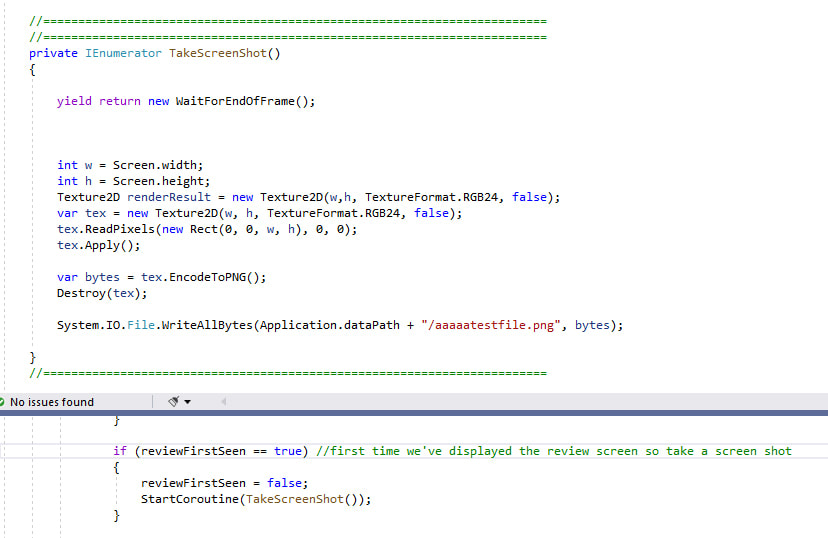
You'd think that taking a screen shot would be easy... but no, not if you want to have the game UI visible. 
Basically the UI get's rendered some time after the camera considers rending is complete so you have to use a co-routine to get the screen shot function to fire at the right time....
This is another "dave won't remember this if he doesn't write it down" post.
Picture
0 Comments

Unity UI Scaling

1/24/2021

0 Comments

 
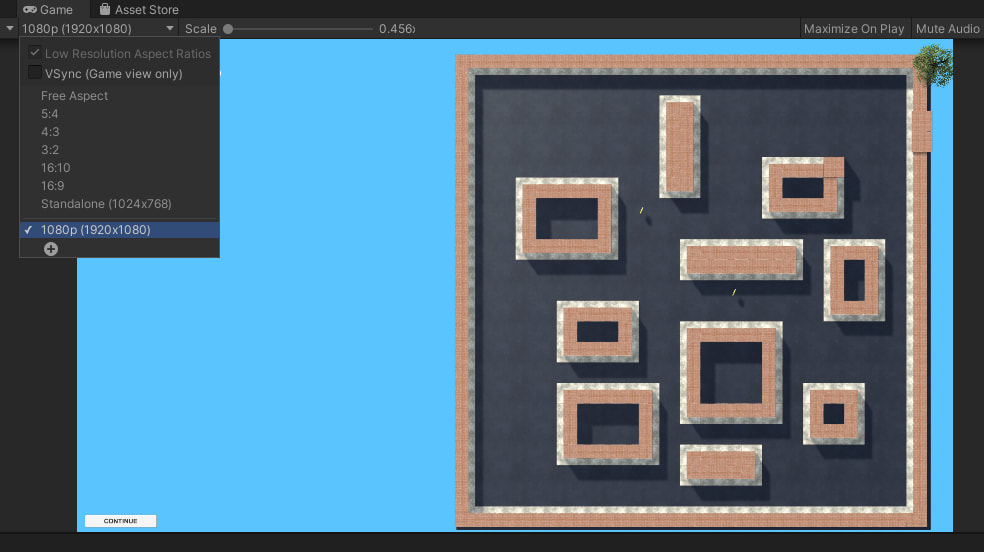
Unities UI is designed to scale to handle different resolution screens. This is great but you probably want the UI to look at at the intended resolution rather than looking good in the scene editor.  To preview the UI while designed it at the intended resolution (in my case 1080p) you can set it thus:
Picture
Of course thenthe UI looks ugly in the scene editor because it's scaled but.. le sigh....I guess tweak the window size to get 50%.

0 Comments

Unity Camera Depth

1/18/2021

0 Comments

 
Unity has this concept of Camera Depth.  It's got nothing to do with the zbuffer, it's the order that the cameras get rendered if you have more than one camera active.   Somehow my main game camera got set to a camera depth of -1 when I added another camera which meant that even if it was the only camera active it didn't get rendered.  So that's an hour I can never have again. 
If your camera mysteriously stops working despite the fact you can see it working just fine in other camera views...  this could be your problem. 

https://answers.unity.com/questions/418471/camera-preview-is-okay-but-game-view-is-not.html


Picture
0 Comments

View Camera Frustum Whilst Editing The Scene

1/18/2021

0 Comments

 
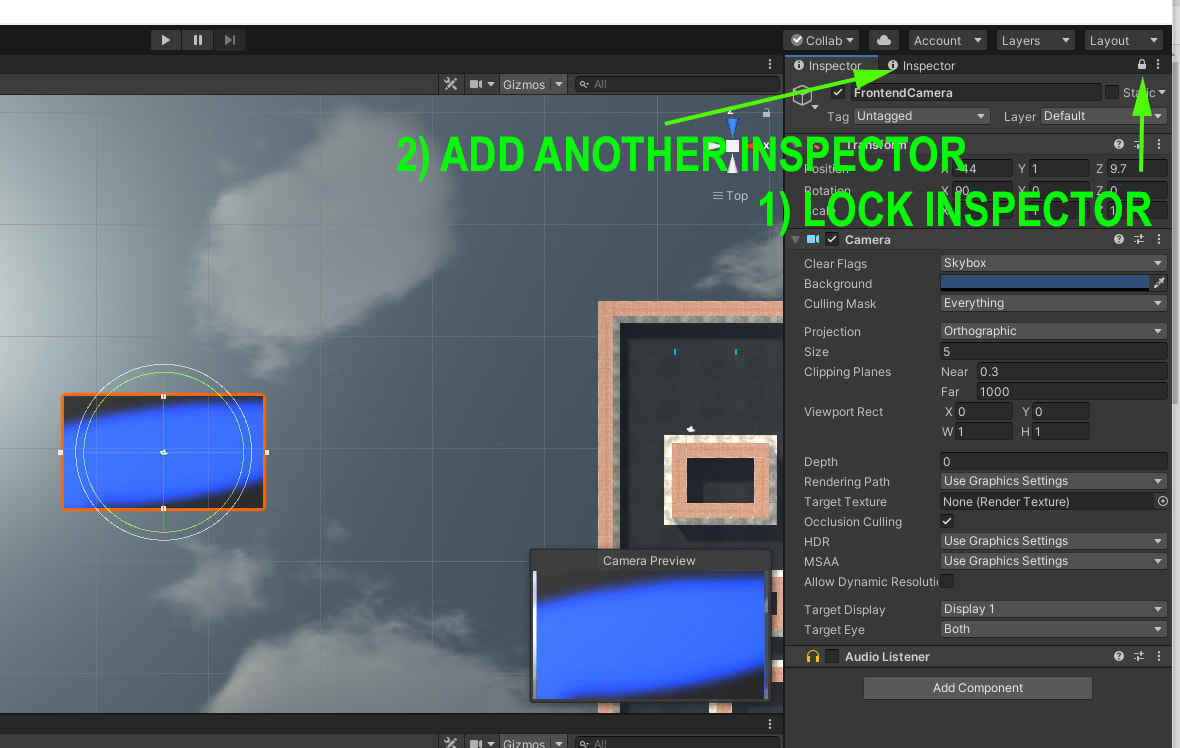
You'd think that making the camera frustum visible in the scene editor would be simple but it's not.
Here is a work around.
  • Select the camera you want to look through
  • Lock the inspector (this will mean Unities camera preview stays visible)
  • Add another inspector tab to edit objects with

Tip from:  https://gamedevworks.com/blog/unitytips-lock-camera-preview-window/

This is another "Dave won't remember this if he doesn't write it down" post.

Picture
0 Comments

Tiled Components In Blender

1/12/2021

0 Comments

 
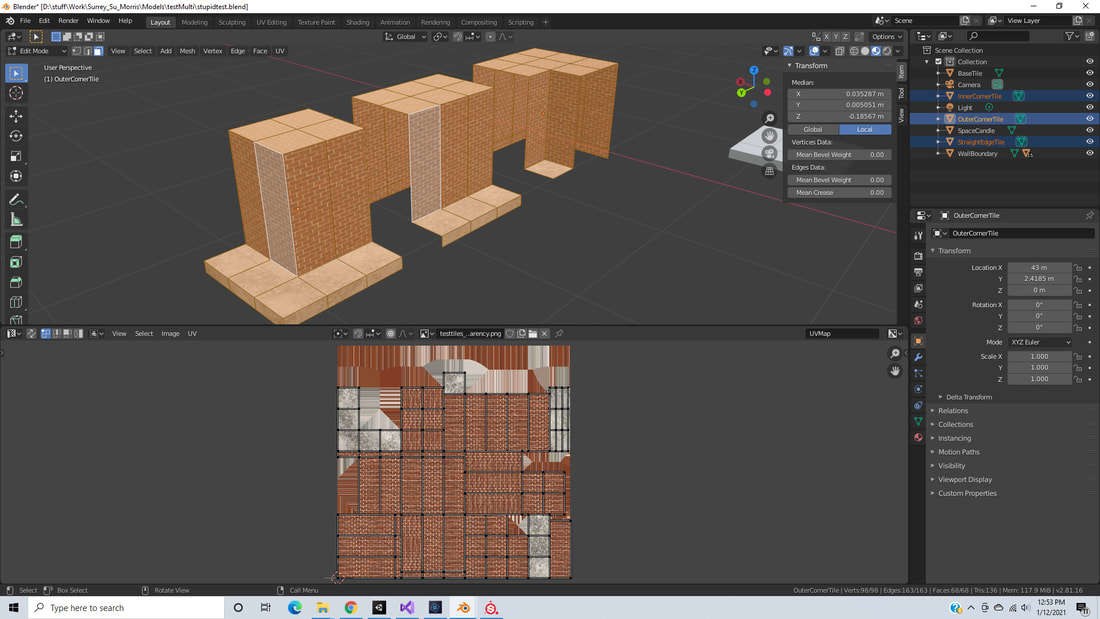
I'm building out a tiled level in Blender for export to Unity.  I have a series of tile components and I want to texture them in Substance but I need the textures to match with regard to density and scale.  I found a trick for this.  If I select all three objects and go into edit more, I can select all the UV coords and do a Smart UV Project.  This means all 3 tiles share the same texture but also means they are scaled consistently. The only problem I found was that smart project sometimes rotates faces to pack the UV map.  My solution to this was to use masking in Substance to get the fill layer textures to match.  It's not perfect, but its better than trying to get the faces to scale manually across multiple UV sets.
Picture
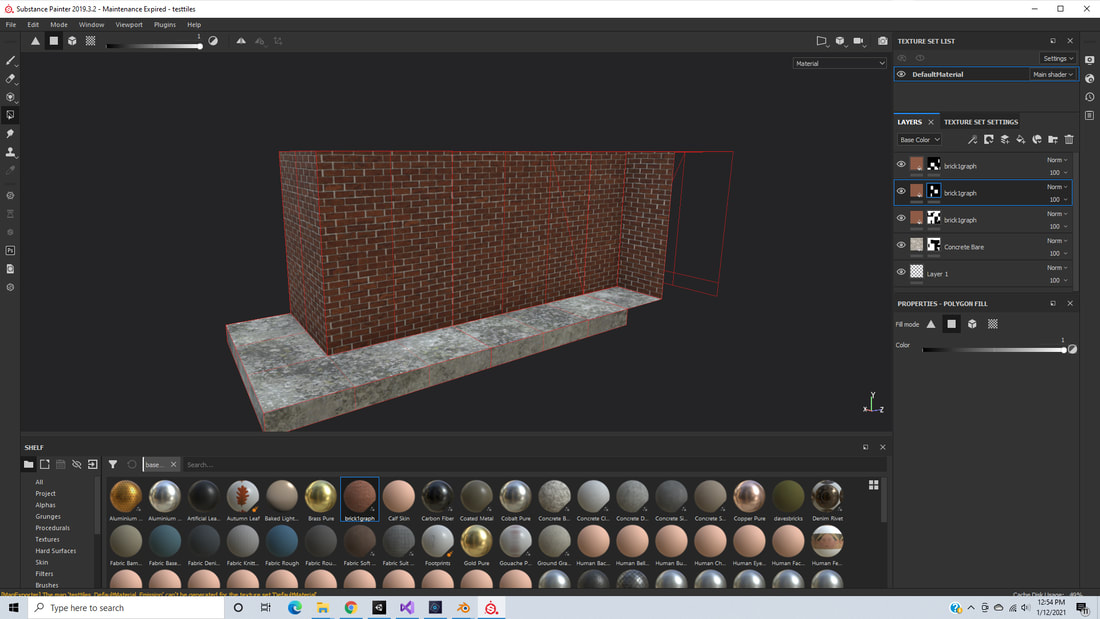
Here you can see in substance I used layer masks to all for rotating the brick texture to match the UVs.  Getting the final alignment with the offset tool was a bit tricky, but it works.
Picture
This is another "Dave won't remember this if he doesn't write it down" post. 
0 Comments

Unity Cracks in Shadows

1/11/2021

0 Comments

 
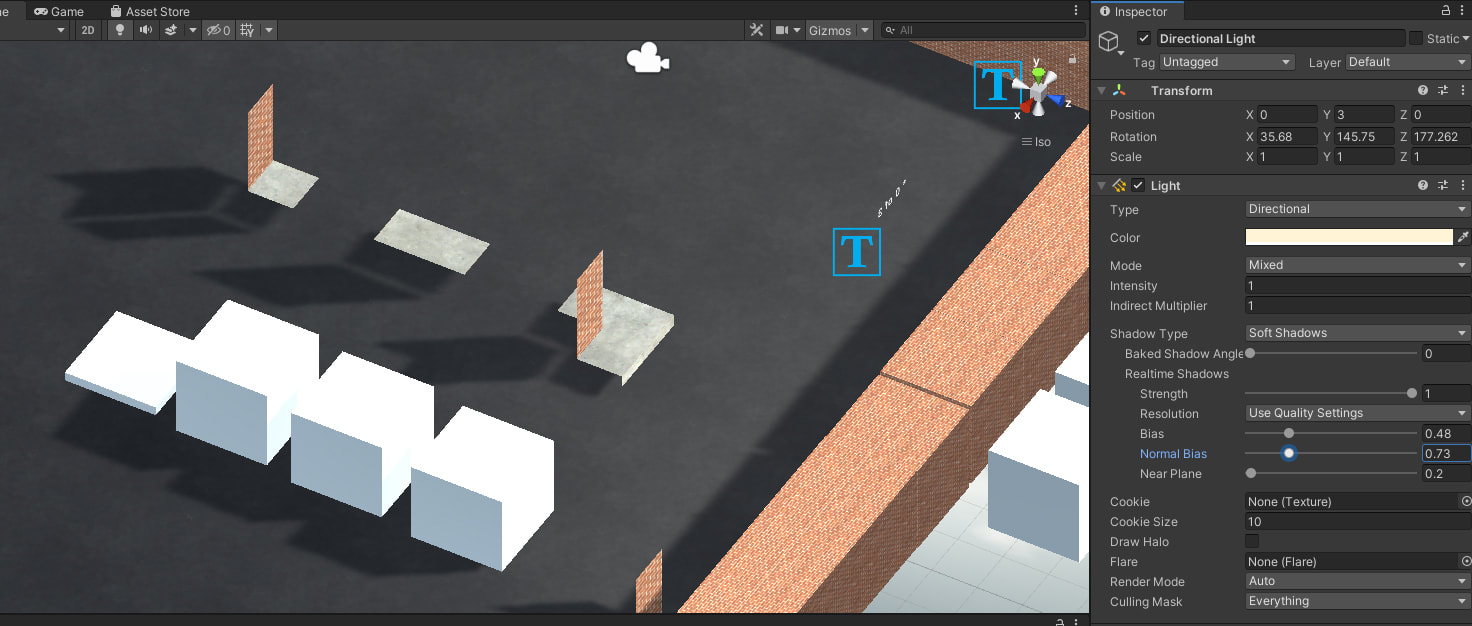
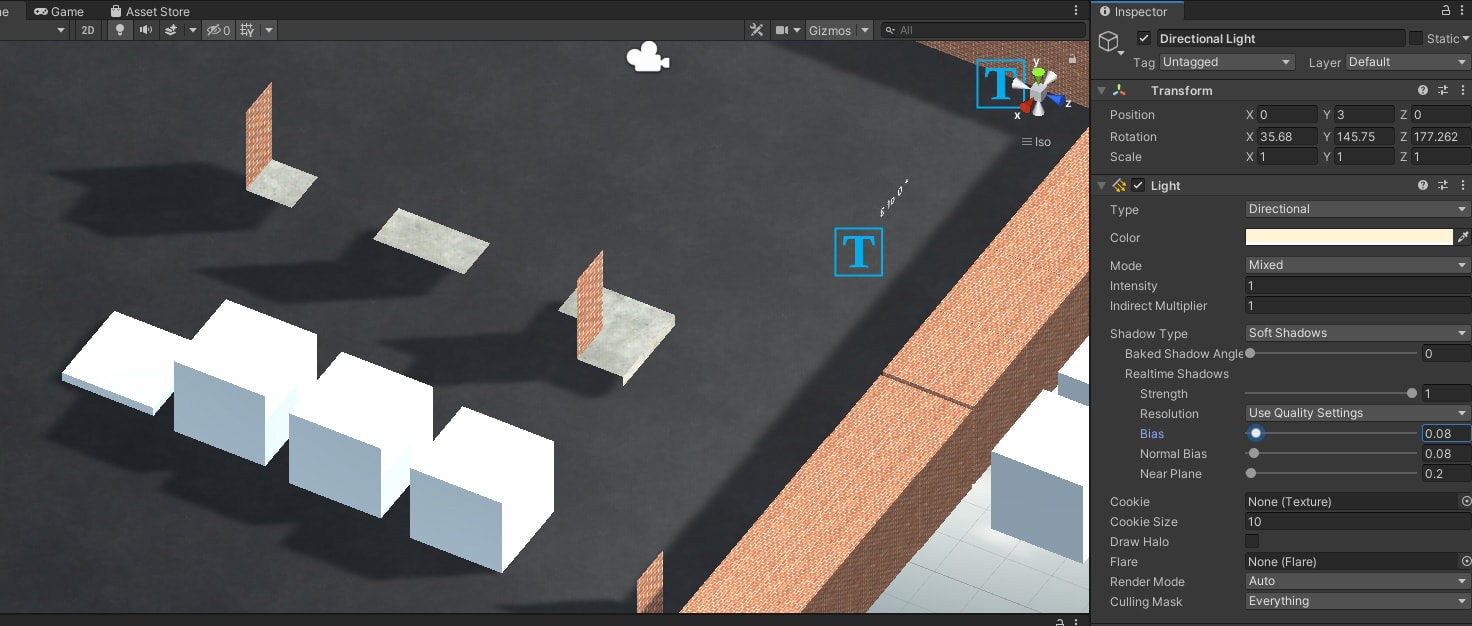
I had weird cracks in my Shadows.
Picture
Reducing Bias and Normal Bias appear to fix or reduce this... and I don't have time to read up on why... 
Picture
This is another one of those if I don't write it down I won't remember posts... because I have a memory like a goldfish.  Here's the fix... and the credit.... 
0 Comments

Unity Text-Mesh-Pro Sort Order

1/8/2021

0 Comments

 
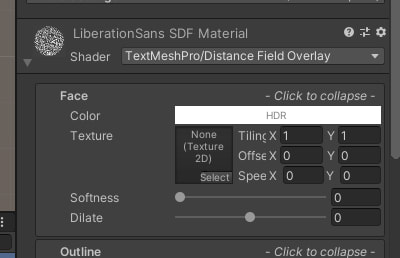
How to get Unity text mesh pro (tmp) objects to render last or without clipping for HUD elements.
TBF, I'm not really sure what TMP is doing and I don't really care, but changing the shader seems to do what I want.  This is the right shader on PC.  For some reason my project defaulted to a different one.
This is another "Dave made a blog post because he'll forget if he doesn't write to down" blog post. 
Picture
0 Comments

New Ergonomic Setup

7/22/2019

0 Comments

 
For the last six months I've been using a laptop on a kitchen table as my primary computer.  I did hook in a monitor, keyboard and mouse but it was less than ideal especially for doing long projects so I decided to upgrade my set up.
I've used sit-stand desks before. I had a Varidesk that I bought at NVIDIA which I really liked.  My personal habit is to stand for light tasks but sit for anything that needs a lot of concentration so I need to be comfortable in either position and to be able to switch instantly. 

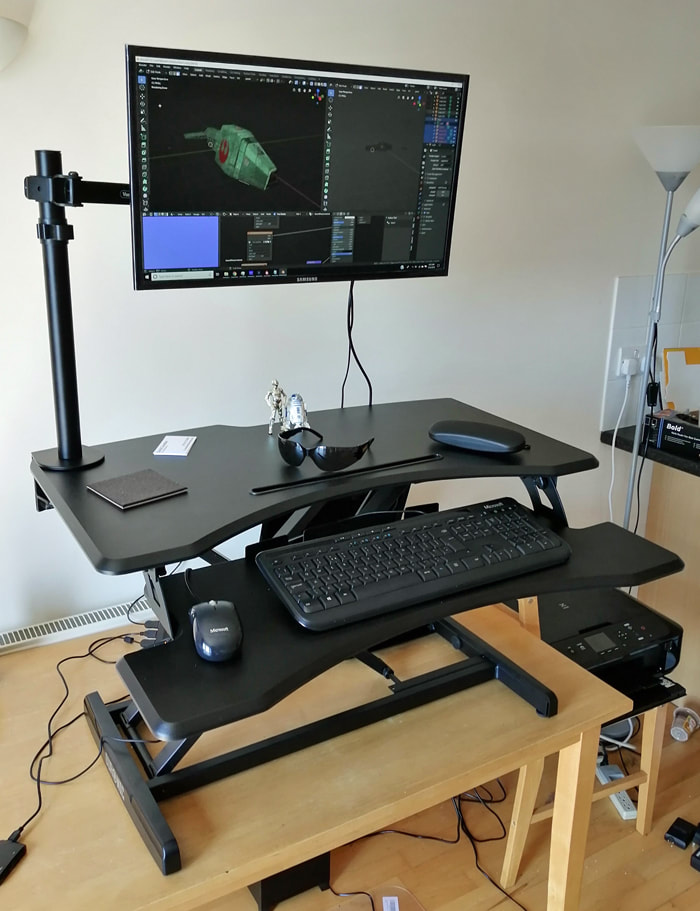
​Here's the set up I came up with:
Picture

The Chair

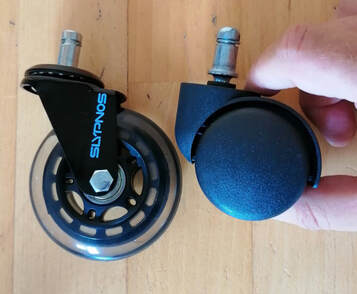
I got a cheap task chair from Amazon.  It's nothing flashy.  But I did some upgrades.  The last chair I bought was expensive and wasn't really tall enough for me (I'm 6'2").  I realized that I could make it taller by adding a longer gas strut, but because it was a really complex chair with lots of cable operated adjustments removing the seat pan was a big job, so I just replaced the wheels with roller blade wheels. This made the chair instantly an inch taller while reducing wear on my floor.
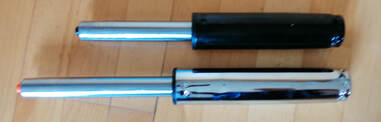
For my new chair I bought a longer gas strut and roller blade wheels before even assembling it.  Removing a gas strut from a chair as shown here requires use of a hammer and some brute force, so it's much easier to start with a new chair. 
Picture
| feel the need, the need for speed, also.. I want my chair to be higher.
Picture
A 9" Strut adds about 2 inches to the overall height of the chair.
The struts and wheels are easily available on Amazon or anywhere that sells office furniture. ​ The struts seem to be a standard size, but the wheels come with several different mounting sizes so make sure you get the right ones.  I paid £16 for the wheels and £13 for the gas strut.  The basic chair was £46.   So that's about 75 pounds for a chair that actually fits me. 
​

Standing Desk

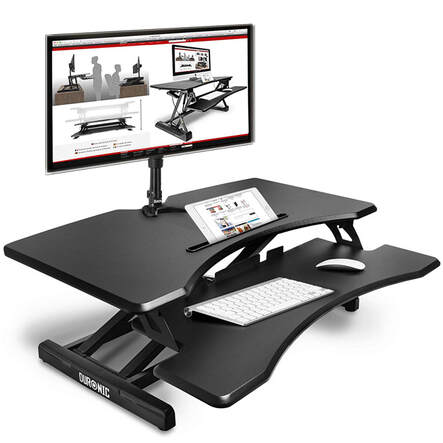
Back in my NVIDIA days I bought a Varidesk to see if I liked a sit stand arrangement.  As I was paying for it myself I didn't want to spend too much money only to find it was a gimmick I didn't like, however I did find that I used it quite a bit.  I'd say in a typical office day I would stand about 25% of the time.  I found that doing emails and powerpoints was good standing up, but anything like coding or 3D modelling required me to sit down.  When I got the Varidesk it was almost the only game in town but now there are dozens of different yet similar desks available.  I got the Duronic DM05D17.  It moves up and down vertically, where as the Varidesk had more of a cantilever operation.  I think the Varidesk used springs and the Duronic uses a gas strut, but apart from that they are very similar.  One thing to be aware is that this product doesn't come with the monitor stand as shown in the product image.  For good posture you really want your monitor at the right height...   The desk was £110. Bargain. 
Picture

Monitor mount

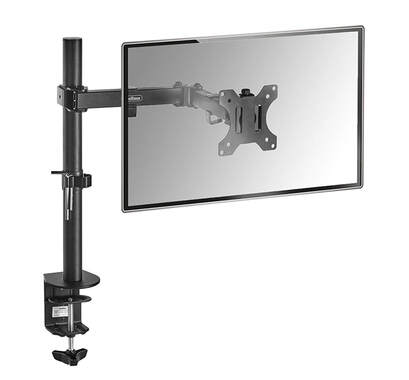
 I like my monitor mounted high as this forces me to sit upright rather than slumping.  I've used all manner of hacks in the past including manuals, books, a bin and even a tupperware container meant for a cake.  A check  on Amazon showed that you can get proper mounts for not much money these days, so I lashed out on a Von Haus single arm bracket.  For £20 how could I not?  Fitting the monitor mount to the rising desk was a bit of a hassle.  The clamp on the mount was much wider than I needed and as a result the tightening knob was preventing the desk from hitting its lowest point.  My solution was to cut the threaded rod down and add a couple of nuts, then tighten the nuts to secure the arm.  The arm itself works fine with decent articulation where you'd expect and very little wobble. 
Picture

Other Stuff

I found a neat little countdown timer extension for Chrome.  I set to 45 minutes so that I remember to take a break regularly.  I also got new glasses.  I seem to be at that age where my eyes get worse all the time.  Sucks, but being able to see with glasses is better than not being able to see. 
​

Last Thoughts

++I'm no ergonomics expert legal disclaimer goes here!! ++
If your back hurts or your eyes or your pee pee, go see a doctor!


It's definitely nice to have a comfy set up.  Its also nice that it didn't break the bank. I was working on a project last week for just a couple of days and could really feel the negative effects on my back.   Hopefully this new setup will let me work for longer with fewer negative impacts. 
0 Comments

Shadertoy Contest Entry

8/10/2018

0 Comments

 
 Here's my entry for the 2018 Shadertoy contest.  The theme was human. Took about 3 days of re-learning old code and wrapping my head around ray marching and distance fields.  Great fun.  The most programming I've done in a couple of years. #stillgotit 

Click on the image below and then hit the play button at the bottom left. 
0 Comments

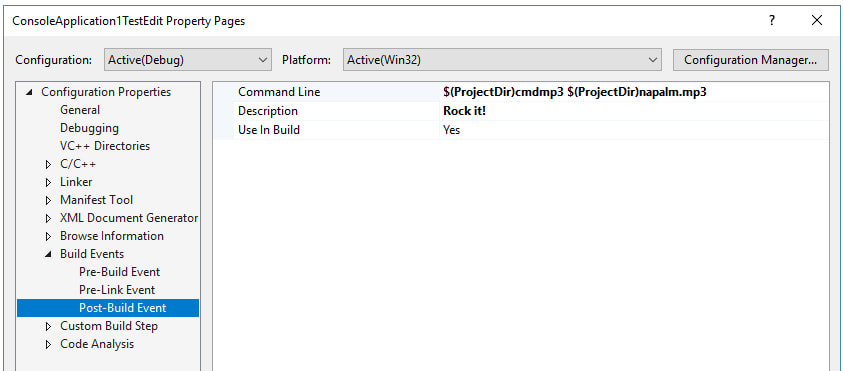
Napalm Death in Visual Studio

4/17/2018

0 Comments

 
Should be pretty much self explanatory.... 
Picture
0 Comments
<<Previous

    David Coombes

    Making stuff

    Categories

    All
    3D Graphics
    3D Printing
    3D Scanning
    AI
    Blender
    Cycling
    Development
    Environment
    Futurism

    Archives

    February 2024
    January 2024
    November 2023
    September 2023
    August 2023
    February 2023
    November 2022
    April 2022
    February 2022
    January 2022
    February 2021
    January 2021
    November 2020
    May 2020
    April 2020
    March 2020
    February 2020
    December 2019
    November 2019
    September 2019
    August 2019
    July 2019
    January 2019
    December 2018
    October 2018
    August 2018
    June 2018
    April 2018
    March 2018
    February 2018
    January 2018
    July 2017
    June 2017
    May 2017
    April 2017
    March 2017
    January 2017
    September 2016
    August 2016
    July 2016
    May 2016
    April 2016
    March 2016
    December 2015
    November 2015
    August 2015
    July 2015
    June 2015
    April 2015
    March 2015
    February 2015
    January 2015
    December 2014
    November 2014
    October 2014

    RSS Feed